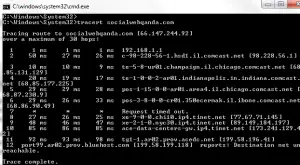
 Both ping and traceroute are tools to test or troubleshoot a network connection and diagnose problems between your computer/ISP and a destination server.
They are commands entered on the command line interface, and are similar in the fact that they both can determine if a particular IP address is accessible by your computer, and how long it takes to reach the destination.
In both cases, your computer sends a packet of information, and reports either a successful or unsuccessful trip.
For the latter category, the ping or traceroute may be blocked, either due to a firewall or another type of security measure.
The request also may time out, indicating that the computer cannot connect to the server due to a breakdown somewhere.
One use for both ping and traceroute would be to test your own computer’s network connection. In this case, it is important to try multiple destination servers, as a particular IP might restrict access and thus return a timeout or error, even when your computer may be connected and able to access others.
Both tools could also be used to test whether a particular destination server, such as a website, is online. In this example again, it is important to remember that the website may block pings.
Ping vs. Traceroute Explained
Beyond this, however, there are also numerous ways in which ping and traceroute are different.
A ping returns information about how long the packet takes to go to the destination server and back to your computer, but a traceroute gives information on the exact route your packet takes on the way to its destination.
It shows you the identity of all “hops”—the intermediate points on the trip from your computer to the destination server. A traceroute also returns the time that each hop takes. These two facts allow you to do more detailed troubleshooting.
For example, if you are testing why your network connection is behaving slowly, a traceroute will tell you all the intermediate hosts that packets are sent to on the way to a destination website.
It is usually possible to ascertain their geographical location as indicated in the hostname, and you will be able to see which hops are taking the most time.
This can show you where the connection is breaking down: either on your computer, on the destination server (such as a website you are trying to visit) or some server in the middle.
Another use for traceroute would be if you have purchased server space to host a website, and you want to determine whether a slow connection is the fault of your host, or if it is somewhere in the middle and out of their control (as they will almost always assert!).
In this case, it is also a good idea to perform a traceroute when your website is behaving normally, so you have something to compare to when you are experiencing problems.
Overall, ping is quicker and easier to diagnose your own connectivity or that of a destination server, but traceroute will give you much more detailed information in order to get to the heart of a problem.